NO.56 Case Study 2 – Proseware Inc.
Background
Proseware Inc. develops AI-powered knowledge management solutions for enterprise customers.
The company is modernizing its platform to support semantic search, intelligent document retrieval, and real-time partner integrations.
The engineering team uses Python and Azure SDKs. The architecture is being redesigned to support containerized microservices, vector search workloads, and serverless backend processing.
Planned Application Architecture
Microservices are containerized by using Docker.
Code for containerized microservices and Azure Function apps is developed locally but stored in a GitHub repository.
Custom images for containerized microservices are stored in Azure Container Registry (ACR).
Base images are stored in Docker Hub. Custom images must be rebuilt automatically whenever their base images are updated.
Azure Cosmos DB for NoSQL stores documents, metadata, and vector embeddings.
Azure Functions generate vector embeddings of Azure Cosmos DB for NoSQL-hosted documents and send messages to Service Bus to trigger search index updates.
Azure Container Apps (ACA) apps host backend API services that provide semantic search across Azure Cosmos DB for NoSQL documents. API services process Service Bus messages and update search indexes.
Azure Kubernetes Service (AKS) processes batch vector embedding regeneration for existing Azure Cosmos DB for NoSQL documents (whenever the embedding model is changed).
An extranet-facing containerized webhook allows business partners to submit documents to be processed by internal AI workflows for semantic search and retrieval.
Monitoring
Telemetry generated by Azure resources is sent to Azure Monitor.
A Log Analytics workspace is used to collect ACA apps logs, AKS container logs, and Azure Functions apps logs.
Monitoring of Azure Functions is currently implemented by using Azure Application Insights SDK instrumentation.
Business Requirements
Embeddings for new or updated Azure Cosmos DB for NoSQL-hosted documents must be automatically generated.
Backend API services must scale automatically during business hours.
Cold start delay of backend APIs must be minimized.
Secrets must be stored outside of container images.
Developers must be able to correlate telemetry across Azure Functions hosts and apps.
All tracing must be implemented by using OpenTelemetry SDK instrumentation.
Development efforts must be minimized.
Technical Requirements
Container images must be built automatically and validated before code updates are merged into the main branch.
Image build automation must run inside the Azure Container Registry, eliminating dependency on local developer machines and external build services.
Dependency of image builds on local developer machines must be eliminated.
Event-driven scaling in ACA must occur based on the number of pending messages in the Azure Service Bus queue.
Azure Cosmos DB for NoSQL RU consumption must be minimized.
Vector similarity search must use embeddings stored in Azure Cosmos DB for NoSQL.
The partner-facing containerized webhook service must run on Azure App Service.
Secrets must NOT be stored in container images, source control, or application configuration directly. They must be accessed securely at runtime.
All secrets must be stored centrally in Azure Key Vault and accessed at runtime through a managed identity.
Azure App Service must supply secrets at runtime without relying on external services.
Resources and workloads must be deployed by using Bicep templates through an automated, version-controlled pipeline. Local and command-line deployments must be eliminated to ensure repeatable, auditable deployments.
Known Issues
RU consumption spikes during vector similarity queries.
Drag and Drop Question
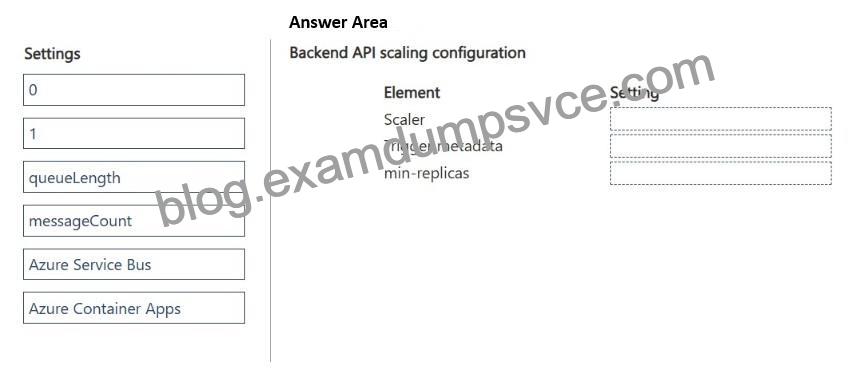
You need to configure event-driven scaling for the backend API services to meet the technical requirements.
Which settings should you use for each element? To answer, move the appropriate settings to the correct elements. You may use each setting once, more than once, or not at all. You may need to move the split bar between panes or scroll to view content.
NOTE: Each correct selection is worth one point.
Explanation:
Scenario, technical requirements.
Event-driven scaling in ACA must occur based on the number of pending messages in the Azure Service Bus queue.
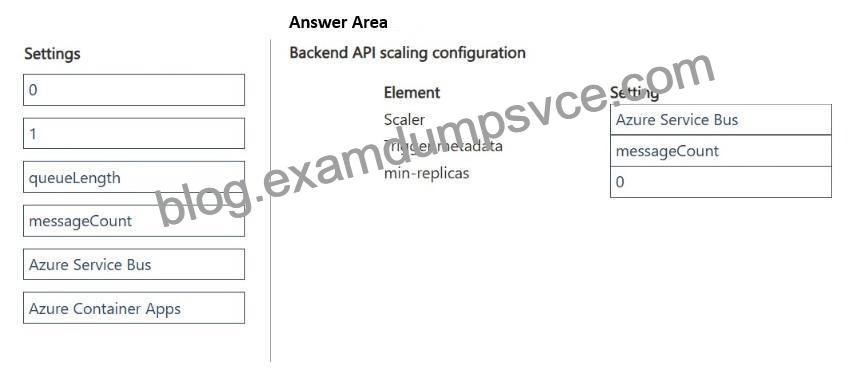
Box 1: Azure Service Bus
Scaler TypeType
Set the scale rule type to custom.
KEDA Scaler Name: Set the type inside the custom specification block to azure-service-bus.
Box 2: messageCount
Trigger Metadata Values
The metadata block dictates how KEDA calculates the required replica count.
Configure the following core metadata parameters:
queueName: The explicit string name of your targeted Azure Service Bus
*-> queue.messageCount: The target integer threshold of concurrent pending messages assigned per replica (e.g., 5 or 10). KEDA uses this value to scale out systematically.
activationMessageCount: Set to 1 or 0. This defines the exact metric floor required to transition the container app out of a dormant state.
namespace: The canonical name of your Service Bus namespace
Box 3: 0
Min-Replicas ConfigurationValue
Set –min-replicas to 0.
Setting this value to zero enables full serverless cost efficiency. KEDA actively handles the background polling, allowing your backend API containers to scale down completely and run zero active replicas when the Service Bus queue contains zero pending messages.
Reference:
https://oneuptime.com/blog/post/2026-02-16-how-to-set-up-keda-based-auto-scaling-with-queue-triggers-in-azure-container-apps/view
![The Ultimate Microsoft AI-200 Dumps PDF Review [Q43-Q60]](https://blog.examdumpsvce.com/wp-content/uploads/2026/09/banner-MzQyTUyzSEtJTktONU82S0uyMEgxSTUwSba0SEw0NTXVyypI5wrJSFUIzSnJzE0sSVXwzUwuyi_OTytRcPTUNTIwUHApzS0oVghwcVMISi3LTC1XiA40MdYNNDOI5TIAAA@@.jpg)


